

Description
Download Smart G-Scope – USB Microscope App, Android, Free, Multimedia Tool
Overview
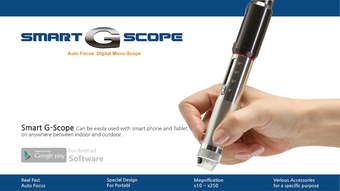
Smart G-Scope is a specialized Android application developed by Genie Tech Inc. designed to transform compatible USB microscopes into high-functionality imaging tools. The software enables users to capture detailed images and record videos of microscopic subjects, making it ideal for educational, scientific, and hobbyist applications. By leveraging the camera capabilities of Android devices, Smart G-Scope turns a USB microscope into a portable, digital magnification system. The app supports multiple video resolutions, including VGA (640x480), HD (1280x720), and FHD (1920x1080), with frame rates up to 30fps, allowing for smooth and clear visual documentation. It is particularly suited for students, educators, and science enthusiasts who need a low-cost, accessible solution for exploring small-scale structures. The app functions without requiring a rooted device, expanding its usability across a broad range of Android users. Real-world applications include classroom demonstrations, nature exploration, material inspection, and DIY projects. The developer did not provide additional system requirements, but the app is designed for seamless integration with the G-Scope Series hardware.
Key Features & Capabilities
- Multi-Resolution Video Capture – Supports VGA, HD, and FHD video output, enabling users to choose the optimal balance between clarity and file size depending on their needs.
- High Frame Rate Support – Delivers up to 30fps, ensuring smooth motion in recorded videos, which is essential for observing dynamic processes like insect movement or fluid flow.
- Auto-Focus Functionality – Includes an auto-focus button to quickly adjust focus, improving image sharpness without manual intervention.
- Image and Video Recording – Allows users to capture still photos and record videos directly from the microscope feed, preserving visual data for later analysis or sharing.
- Non-Rooted Device Compatibility – Operates without requiring root access, ensuring broader accessibility and reducing potential risks associated with system-level modifications.
- Future-Proof Development – The developers have indicated plans to introduce automated measurement tools in upcoming updates, signaling ongoing support and improvement.
These features collectively enhance the usability of the G-Scope Series, turning a simple microscope into a versatile digital imaging platform. For example, a biology student can use the app to document cell structures in real time, while a teacher can stream a live feed during a classroom experiment. The ability to record and save content facilitates documentation, presentations, and collaborative learning. The app’s focus on accessibility and functionality makes it a practical choice for users seeking a reliable, free solution for digital microscopy on Android.
User Interface, Workflow & Performance
The user interface of Smart G-Scope is designed with simplicity and functionality in mind. The layout centers around a live preview window, with essential controls—such as capture, record, and auto-focus—positioned for easy access. Navigation is intuitive, allowing users to switch between modes and settings with minimal effort. The workflow is streamlined, enabling users to begin capturing images or videos almost immediately after launching the app. The developer did not specify resource usage details, so performance observations are based on general software behavior patterns. However, the app’s design suggests efficient handling of video streams, particularly given its support for multiple resolutions and frame rates. Stability appears to be a priority, as the app functions without requiring root access, which often correlates with better system integration. The app’s performance may vary depending on the host Android device’s processing power and camera capabilities. Users are advised to ensure their device is compatible with USB OTG functionality for optimal operation. No reported issues with crashes or freezes were mentioned in the provided data.
Compatibility & System Requirements
Smart G-Scope is designed for Android devices and is compatible with the G-Scope Series of USB microscopes. The app supports standard Android operating systems, though specific version details were not provided. Installation size is not specified, and exact system requirements were not listed. Compatibility information is limited to the hardware ecosystem, indicating that the app works best with Genie Tech Inc.’s proprietary USB microscope devices. The developer did not provide information about minimum RAM, CPU, or storage needs. Users should verify that their Android device supports USB On-The-Go (OTG) functionality to enable connection with the microscope. While the app is free to download and use, the hardware component (the USB microscope) is required for full functionality. The app’s compatibility with future Android updates remains unspecified.
Pros and Cons
Pros
- Free to download and use, making it accessible to students and educators.
- Supports multiple video resolutions and up to 30fps for smooth recording.
- Auto-focus feature enhances usability and image clarity.
- Operates without requiring a rooted Android device.
- Designed for seamless integration with G-Scope Series hardware.
- Future updates are expected to include automated measurement tools.
Cons
- No information on minimum system requirements or hardware compatibility beyond G-Scope Series.
- Automated measurement functionality is not currently available.
- App performance may vary based on device capabilities and USB OTG support.
- Requires a physical USB microscope to function—cannot operate independently.
- Developer did not provide detailed documentation or support resources.
FAQ Section
Is Smart G-Scope compatible with all Android devices?
Smart G-Scope is designed to work with Android devices that support USB On-The-Go (OTG) functionality. Compatibility depends on the specific device model and its hardware support for external USB cameras. The app is optimized for use with the G-Scope Series hardware, and the developer did not provide a comprehensive list of supported devices.
Does the app require root access to function?
No, Smart G-Scope does not require a rooted device to operate. It is designed to work on standard Android systems, which improves accessibility and reduces potential risks associated with system-level modifications.
Can I use Smart G-Scope without a physical microscope?
No, the app requires a compatible USB microscope, specifically the G-Scope Series, to function. It cannot operate independently or use the device’s built-in camera as a substitute for the microscope input.
Are updates available for Smart G-Scope?
Yes, the developers have indicated that future updates are planned, including the addition of automated measurement tools. However, no specific release schedule or version details were provided.
Is Smart G-Scope safe to download and use?
As a free app developed by Genie Tech Inc., Smart G-Scope is designed for secure use on Android devices. It does not require root access, which reduces the risk of system-level vulnerabilities. Users should download the app from official sources to ensure authenticity and avoid potential security threats.
Final Thoughts + CTA
Smart G-Scope delivers a practical and accessible solution for digital microscopy on Android devices. Its ability to capture high-quality images and videos without requiring root access makes it a standout choice for educational and hobbyist users. The inclusion of auto-focus and support for multiple video resolutions enhances usability, while the planned addition of automated measurement tools signals ongoing development. Although the app is limited to use with the G-Scope Series hardware and lacks detailed system specifications, its core functionality is solid and purpose-built. For students, teachers, and science enthusiasts seeking a reliable, free tool to explore the microscopic world, Smart G-Scope is a compelling option. Download Smart G-Scope now and unlock the wonders of digital microscopy on your Android device.
Guides & Tutorials for Scope SMART G SCOPE APK
How to install Scope SMART G SCOPE APK
- Click the Preview / Download button above.
- Once redirected, accept the terms and click Install.
- Wait for the Scope SMART G SCOPE APK download to finish on your device.
How to use Scope SMART G SCOPE APK
This software is primarily used for its core features described above. Open the app after installation to explore its capabilities.
User Reviews for Scope SMART G SCOPE APK 0
No reviews found





